
Stylish Indian Man Portrait AI Prompt copy
Copy AI image prompts and create stunning images using ChatGPT, Midjourney, DALL·E, Grok Ai, and Stable Diffusion. Free, ready-to-use prompts updated regularly.
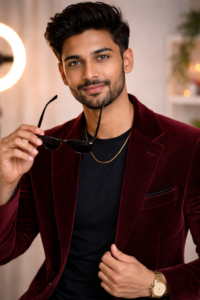
"Ultra-Realistic 8K DSLR Portrait Prompt

Ultra-realistic 8K DSLR studio portrait of a stylish young Indian man with thick, voluminous quiff hairstyle, neatly trimmed beard, warm brown eyes, and a confident, friendly smile. He is wearing a tailored beige blazer over a fitted black crew-neck t-shirt, paired with a minimal gold chain necklace and a premium gold wristwatch.

He is gently adjusting his blazer with one hand while looking directly into the camera with a calm, charismatic expression.

Soft indoor studio setup with a blurred aesthetic background featuring a glowing ring light and subtle warm decorative lights, shallow depth of field, sharp focus on the face, cinematic composition, highly detailed natural skin texture, realistic tones, 85mm lens, f/1.8, HDR, fashion photography style, premium editorial look, sharp clarity, natural shadows, no overexposure, no plastic skin effect."
✍️ Watermark
Black Text Bottom-right corner watermark:
© promptpixhub.com
Style:
• Ultra-Realistic
• DSLR Photography
• Fashion Editorial
• Cinematic Portrait
• Studio Lighting
• Influencer Look
Aspect Ratio:
• 4:5 (Instagram ready)
• 1:1 (Profile photo)
• 3:4 (Classic portrait)
Best for:
AI Image Generators
Camera Angel:
85mm lens, f/1.8 aperture, HDR,
Face:
ultra-realistic 8K DSLR image of a confident Indian man
Look:
Influencer Look
Resolution:
8K, high quality
How to Use This Prompt
Follow these steps to get the best results from any AI image prompt:
- Copy the Prompt: Click the “Copy Prompt” button above to copy the entire text to your clipboard.
- Paste into AI Tool: Open your preferred AI image generator (ChatGPT, Midjourney, Grok Ai, Gemini Ai, DALL-E, etc.) and paste the prompt.
- Customize as Needed: Modify elements like subject, setting, or style keywords to match your specific vision.
- Adjust Parameters: Set appropriate aspect ratio, quality settings, and model version based on your AI tool.
- Generate & Refine: Run the prompt, then examine the results. If needed, tweak the prompt and regenerate.
- Experiment with Variations: Try adding or removing keywords to explore different creative directions.